
Three app routes on 1win.ng
Each route opens the same account, casino lobby and naira cashier, but they reach the phone in different ways. The Android app is a program installed from the page 1win.ng points to, the iPhone route is a web app pinned through Safari, and the PWA is the site itself opening in its own window. None of them comes from an app store listing in our check.
The Android app offered on 1win.ng
On an Android phone the menu shows “1win for Android” with the line “200 Points bonus for installing the app”. The site’s own steps are three: “Scan the QR code”, get the app onto your smartphone from the page the code opens, and “Install it”. We read the offer and the steps on 13.10.2026 but did not install the app, so this page gives no version number, file size or permission list, and we did not check what the 200 Points can be used for. Start from 1win.ng typed into the browser yourself, never from a file forwarded in a chat group.
On iPhone: 1win’s own Safari steps
On an iPhone the same menu item reads “1win for iOS”, and the steps 1win.ng shows lead to the home screen, not to the App Store:
- “Scan the QR code”.
- “Copy the link and open it in Safari on your smartphone”.
- Tap “Share”.
- Select “Add to Home Screen”.
- Tap “Add”.
The result is a web app: an icon that opens 1win.ng, with the pages still loading from the site. Our 13.10 look used an iPhone browser setting, not a physical iPhone, so we have not seen the icon on a real device.
Moving around the mobile site
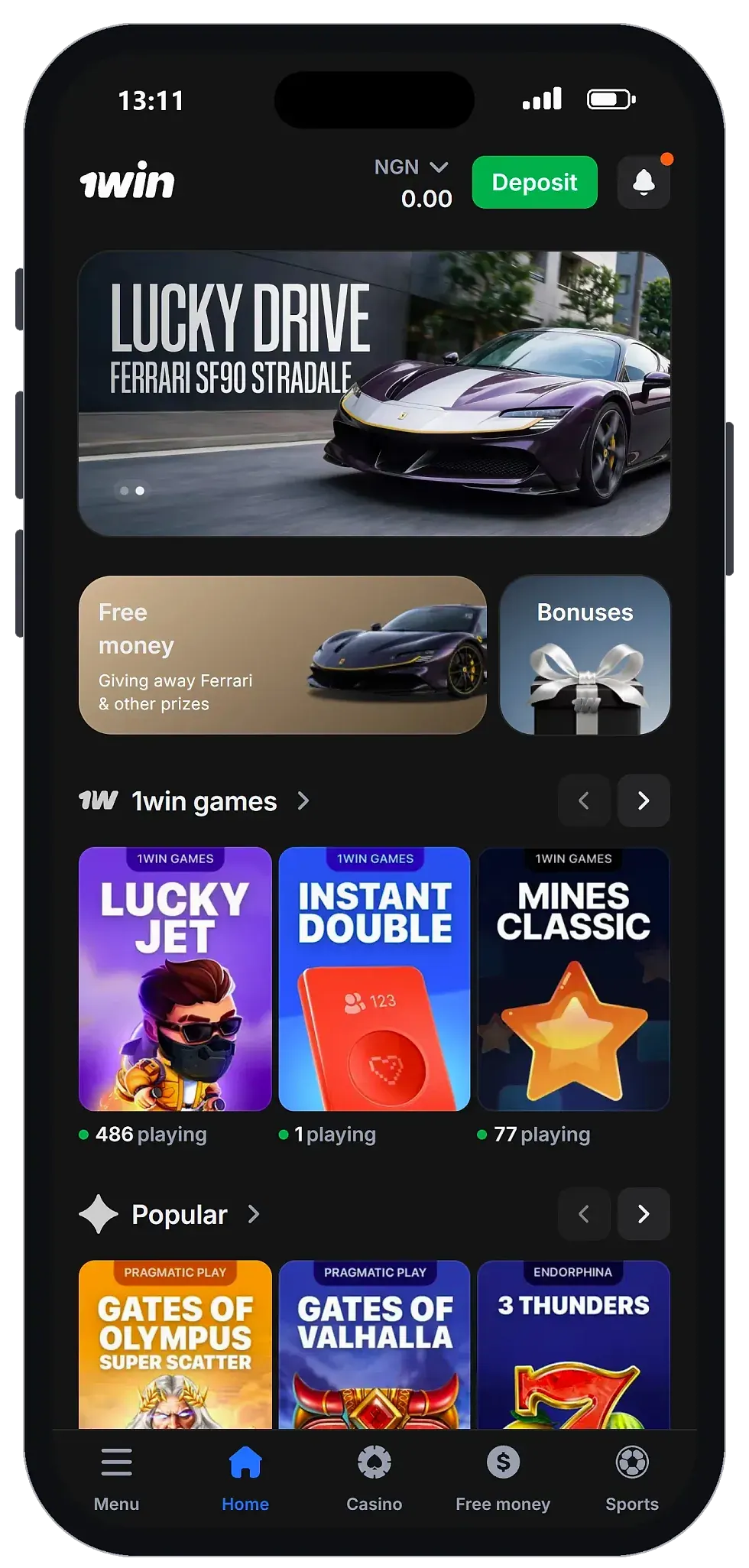
The bottom bar carries five labels: Menu, Home, Casino, Free money and Sports. In our check every main area was one or two taps away, so going from a slot back to the lobby needs no scrolling through the home page. Menu opens the longer list of sections, where we saw Sports, Trading, Poker and a VIP Club entry.
Sports is the last label in the bar, and it is the closest thing to a 1win betting app that we saw. On 13.10 its menu showed Top, Live, Upcoming, TOP Bets, Esports and Bet history; we placed no bet, so confirm markets, live betting and cash-out in the sportsbook before relying on them.
The casino tab as a 1win casino app
For a casino player, the Casino label does the job of a 1win casino app. It opens the lobby with a search field and a Providers tab with an A–Z list, so on a small screen a title can be typed instead of found by swiping through thumbnails. Through that search we found the crash titles Aviator, JetX, Spaceman and Lucky Jet, and the home screen showed the 1win games Lucky Jet, Instant Double and Mines Classic. A separate 1win game app is not needed for any of them: they open in the same browser tab. The size of the catalogue, the studios and the live tables are on our overview of the casino lobby.
1win as a web app (PWA): the app-style route without installing a file
A progressive web app (PWA) is a website saved to the phone’s home screen so that it opens from its own icon, like an app, while the pages still come from the site itself. 1win.ng publishes a web app manifest with the name “1win”, the start page “/” and the display mode “standalone”, which means the home-screen version opens in its own window without the browser’s address bar. Nothing is installed from outside the browser, so there is no file to trust and no permission screen to accept.
Open 1win on AndroidOpen 1win on iPhone18+ · T&C apply · opens 1win.ng in your browser
On iPhone, use 1win’s own Safari steps above. On Android, the Chrome steps below are the browser’s standard function; we did not run them on 1win.ng ourselves.
Pinning 1win.ng in Chrome on Android
- Type 1win.ng into Chrome’s address bar yourself.
- Tap the three-dot menu in the top right corner.
- Choose “Add to Home screen” (on some phones it reads “Install app”).
- Keep or edit the suggested name and tap “Add”.
What the web app does and does not do
The web app takes no space beyond the browser’s cache, and its pages load fresh on each visit, so it has no version to fall behind. We did not test it offline; the lobby, the games and the cashier load from the site, so expect to need data or Wi-Fi. The Android app from the “1win for Android” item is a separate installed program, which we did not install, so we cannot compare how the two behave.
The icon is only as safe as the address behind it. Add it while you are on 1win.ng itself, reached by typing the address, and not from a page opened through a forwarded link or a search ad: a look-alike site pinned to the home screen looks exactly as convincing as the real one.
The cashier and your account on a phone
The cashier we saw on the phone lists naira methods: local wallets, bank transfer, USSD and cards. Our breakdown of each cashier entry names all of them. We made no payment from the phone, so we cannot report how any of them behaves on a mobile connection.
Signing up and verifying from the phone
The sign-up form on the mobile site asks for a +234 number, a password and an optional promo code; our sign-up steps for a Nigerian number go through it. On the phone, pressing Withdraw opened identity verification before any payout form, and the steps from ID check to payout explain what follows.
1win app for iOS
1win’s own iOS steps on 1win.ng lead to Safari and the home screen, not to the App Store, so this page promises no App Store app. What an iPhone user gets is the web app described above, running on the same pages as the Android browser version. Whether the lobby and cashier behave on an iPhone as they did on Android is something to see for yourself before paying in.
1win app update and quick fixes
With the web app there is nothing to update: the pages are served fresh each time you open them, and the only software on the phone that needs updating is the browser. For the Android app, our look did not show how updates reach the phone, so return to the “1win for Android” item on 1win.ng rather than an old file or link. If a 1win.ng page looks broken in the browser, update Chrome from the Play Store, clear its cache for 1win.ng, and retype the address instead of using an old bookmark.
Mobile check summary
| Parameter | Value |
|---|---|
| Checked on | Android phone browser, 08.10.2026; Android and iPhone browser settings, 13.10.2026 |
| Navigation bar | Menu, Home, Casino, Free money, Sports |
| Theme on first open | Dark |
| Reaching a main section | 1–2 taps |
| Android app | Offered under “1win for Android”, 200 Points for installing; not installed by us |
| iPhone | Home-screen web app via Safari, by 1win’s own steps |
| Web app (PWA) | Manifest with display “standalone”: opens in its own window |
Pros
- 1win.ng shows its own install steps for Android and iPhone
- The web app opens in its own window and needs no update
- Main sections are one or two taps from the home screen
- Lobby search and the Providers tab work around the small screen
Cons
- We did not install the Android app, so its size, permissions and updates are unknown
- No App Store app; iPhone users get a web app, not seen on a real device
- Sports features such as cash-out and live betting still need confirming on the site
- No payment was made from the phone, so mobile cashier behaviour is untested
Verdict on the mobile experience
6.6/10 1win.ng offers an Android app, an iPhone home-screen route and a standalone web app, and on Android the mobile site keeps the casino lobby, Sports and the menu within one or two taps. The score reflects what is missing from the evidence: we did not install the Android app, saw the iPhone route only in a browser setting and made no payment from the phone.
It suits Android users who play slots, crash games or live tables in the browser and want one login for everything on 1win.ng.
Who should skip it: iPhone users who want an App Store app, and players who need proof of how the cashier behaves on mobile data before signing up.
Get started on 1win18+ · T&C Apply
FAQ
Is there a 1win app in the App Store or Google Play?
We cannot point to a store listing. 1win.ng offers its Android app through the "1win for Android" menu item and its own QR-code steps, and on iPhone its steps add a web app to the home screen through Safari.
Does 1win have a separate casino app?
We found no separate casino program. The Casino label in the bottom bar opens the lobby, including crash games found by search, in the browser, the web app and the app alike.
Does the 1win web app open without the browser bar?
Yes, according to the site's web app manifest, which sets the display mode to "standalone". Added to the home screen, 1win.ng opens in its own window.
What is in the Menu on the mobile site?
Across our two checks the Menu listed Sports, Trading, Poker and a VIP Club entry, plus the "1win for Android" or "1win for iOS" item. Casino and Sports also have their own labels in the bottom bar.
Does the 1win web app work offline?
We did not test it offline. The icon opens the website, and games and the cashier load from the site each time, so expect to need data or Wi-Fi.